Multi Agent Design
Multi Agent Design
 |
 |
|---|---|
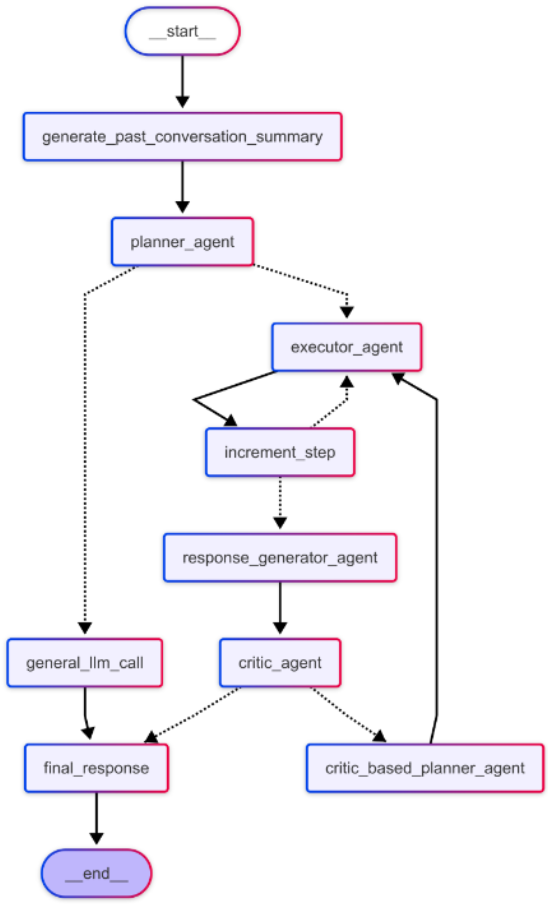
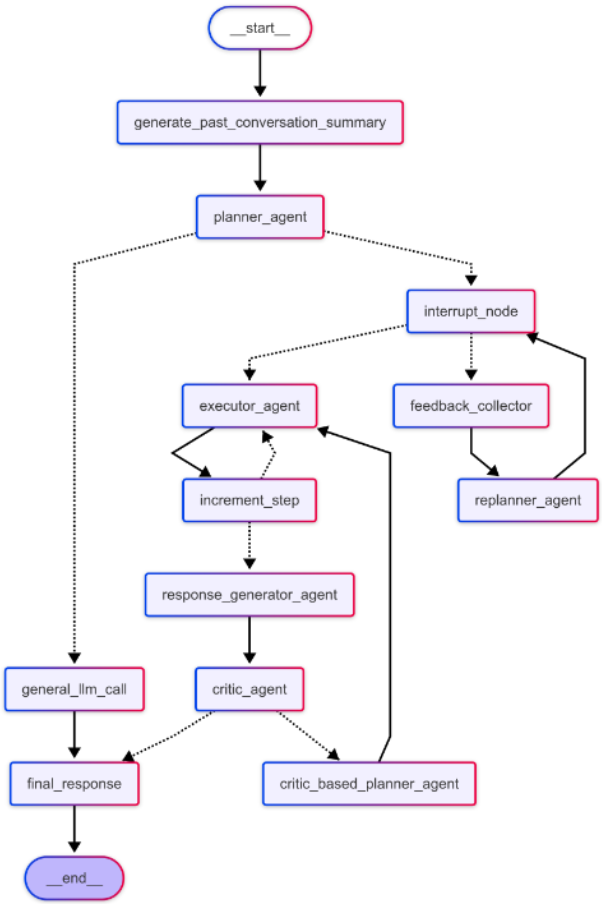
| Multi Agent Without Feedback | Multi Agent With Feedback |
The Multi Agent operates on the Planner-Executor-Critic paradigm, which involves three key components:
- Planner Agent: Generates a detailed step-by-step plan based on the user query.
- Executor Agent: Executes each step of the plan sequentially.
- Critic: Evaluates the outputs of each step by scoring the results.
The framework supports two types of Multi Agents, differentiated by their feedback mechanism: With Feedback (Human-in-the-Loop) and Without Feedback (Fully Automated). Users have the flexibility to enable or disable the Human-in-the-Loop feature based on their requirements.
How It Works:
1. Multi Agent Without Feedback
- The user provides a query, and the
Planner Agentgenerates a clear, step-by-step plan. - The plan is passed to the
Executor Agent, which executes each step sequentially. - The
Response Generator Agentprocesses the results and sends them to theCriticfor evaluation. - The
Criticscores the response: - If the score meets the threshold, the final response is returned to the user.
- If the score is below the threshold, the response is sent back to the
Critic-Based Planner Agentfor refinement. The process repeats until an accurate response is generated.
This entire process happens internally and is not visible to the user. The user only sees the final response, ensuring a seamless experience.
2. Multi Agent With Feedback
- After the
Planner Agentgenerates a step-by-step plan, the user can review the plan. - If the
Human-in-the-Loopoption is enabled: Approval: If the user is satisfied with the plan, they can approve it by clicking a thumbs-up or like button. The approved plan is then passed to theExecutor Agent, which executes each step sequentially. The results are evaluated by theCritic, and the process continues as in theWithout Feedbackmode.Rejection: If the user is not satisfied with the plan, they can reject it by clicking a thumbs-down button and providing feedback. This feedback is sent to theRe-Planner Agent, which refines the plan based on the user's input. The process repeats until the user approves the plan.- Once the plan is finalized and approved, the system proceeds with execution and evaluation, ultimately delivering the final response to the user.
This mode allows users to actively participate in the planning process, ensuring the generated plan aligns with their expectations. By incorporating user feedback at critical stages, the With Feedback mode enhances accuracy, adaptability, and user satisfaction.