Multi-Cloud IAF Backend CI/CD Pipeline — Setup & Usage Guide
Purpose: This guide helps any team set up and use the GitHub Actions CI/CD pipeline to build a Docker image, push it to a cloud container registry, deploy infrastructure services, and deploy the application to a managed Kubernetes cluster — across Azure (AKS), AWS (EKS), and GCP (GKE).
Table of Contents
- What This Pipeline Does
- How It Triggers
- Prerequisites
- Configure Self-Hosted Runner on a VM
- Customize Branch Name and Runner Labels in Pipeline
- GitHub Secrets & Variables Setup
- Pipeline env: Block — How Variables Are Mapped
- Dockerfile Setup
- Workflow File Setup
- Full Pipeline YAML — by Hyperscaler
- How Each Job Works
- Kubernetes Resources Created
- First vs Repeated Deployments
- Infrastructure Services Reference
- Troubleshooting
- Quick Checklist
1. What This Pipeline Does
Commit to GitHub  ──────────────────────────────────────────────────────────┐
    ↓                                                                        │
[GitHub Actions Triggered by push / workflow_dispatch]                       │
    ↓                                                                        │
Deploy Infrastructure Services                                               │
   (Elasticsearch, OpenTelemetry Collector, Phoenix, Grafana, Redis)        │
    ↓                                                                        │
Collect Infrastructure Service IPs                                           │
    ↓                                                                        │
Build Docker Image (tagged with Git commit SHA)                              │
    ↓                                                                        │
Push Image to Cloud Container Registry                                       │
    │                                                                        │
    ├── Azure  → Azure Container Registry (ACR)                             │
    ├── AWS    → Amazon Elastic Container Registry (ECR)                    │
    └── GCP    → Google Artifact Registry (GAR)                             │
    ↓                                                                        │
Deploy Application to Kubernetes Cluster                                     │
    │                                                                        │
    ├── Azure  → AKS (Azure Kubernetes Service)                             │
    ├── AWS    → EKS (Amazon Elastic Kubernetes Service)                    │
    └── GCP    → GKE (Google Kubernetes Engine)                             │
    │                                                                        │
    ├── First time?       → Create Deployment + LoadBalancer Service        │
    └── Already exists?  → Update image only ───────────────────────────────┘
Infrastructure services (Elasticsearch, OpenTelemetry Collector, Phoenix, Grafana, Redis) are deployed once and reused on subsequent runs — the pipeline checks if they already exist before applying.
2. How It Triggers
| Trigger | When |
|---|---|
| Auto | Push to your configured branch (e.g., main, main-copy) |
| Manual | GitHub → Actions → Select workflow → Run workflow |
Update the branch name in the workflow YAML to match your deployment branch before using.
3. Prerequisites
Make sure all of these exist before setting up:
Common (All Hyperscalers)
| Requirement | Details |
|---|---|
| GitHub Repository | With Actions enabled |
| Self-hosted Runner | Linux/X64 machine registered in GitHub |
| Runner Tools | docker, cloud CLI, kubectl |
| Dockerfile | Present at the root of your repository |
| Kubernetes Cluster | Already provisioned and running |
| Container Registry | Already created in your cloud provider |
Azure (AKS) Specific
| Requirement | Details |
|---|---|
| Azure Subscription | With AKS and ACR access |
| Azure Container Registry (ACR) | Already created |
| AKS Cluster | Already provisioned |
| Service Principal | With Contributor or AcrPush + AKS access |
| kubelogin | Installed on the runner |
AWS (EKS) Specific
| Requirement | Details |
|---|---|
| AWS Account | With ECR and EKS access permissions |
| ECR Repository | Already created in AWS |
| EKS Cluster | Already provisioned and running |
| IAM User/Role | With AmazonEC2ContainerRegistryFullAccess + EKS deploy permissions |
envsubst, nslookup |
Installed on runner |
GCP (GKE) Specific
| Requirement | Details |
|---|---|
| GCP Project | With GKE and Artifact Registry enabled |
| GKE Cluster | Already provisioned and running |
| Artifact Registry Repository | Already created |
| Service Account | With roles/container.developer + roles/artifactregistry.writer |
gcloud CLI |
Installed on runner |
Install Tools on the Runner (Ubuntu/Debian)
Common tools (all hyperscalers):
# Docker
sudo apt-get install -y docker.io
sudo usermod -aG docker $USER

# kubectl
curl -LO "https://dl.k8s.io/release/$(curl -s https://dl.k8s.io/release/stable.txt)/bin/linux/amd64/kubectl"
sudo install -o root -g root -m 0755 kubectl /usr/local/bin/kubectl
Azure-specific tools:
# Azure CLI
curl -sL https://aka.ms/InstallAzureCLIDeb | sudo bash

# kubelogin
sudo az aks install-cli
AWS-specific tools:
# AWS CLI
curl "https://awscli.amazonaws.com/awscli-exe-linux-x86_64.zip" -o "awscliv2.zip"
sudo apt-get install -y unzip
unzip awscliv2.zip && sudo ./aws/install

# envsubst and nslookup
sudo apt-get install -y gettext dnsutils
GCP-specific tools:
# gcloud CLI
curl -O https://dl.google.com/dl/cloudsdk/channels/rapid/downloads/google-cloud-cli-linux-x86_64.tar.gz
tar -xf google-cloud-cli-linux-x86_64.tar.gz
./google-cloud-sdk/install.sh
source ~/.bashrc

# gke-gcloud-auth-plugin
gcloud components install gke-gcloud-auth-plugin
4. Configure Self-Hosted Runner on a VM
A self-hosted runner is a machine (VM or physical server) that runs your GitHub Actions jobs. This pipeline requires a runner with the labels self-hosted, Linux, X64, and a custom label of your choice (e.g., lafbe, cli1, gke-runner).
Step 1 — Prepare Your VM
Use any Linux VM (AWS EC2, Azure VM, GCP Compute Engine, on-prem, etc.). Recommended specs:
| Resource | Minimum |
|---|---|
| OS | Ubuntu 20.04 / 22.04 (64-bit) |
| CPU | 2 vCPUs |
| RAM | 4 GB |
| Disk | 30 GB |
Step 2 — Register the Runner in GitHub
- Go to your GitHub Repository.
- Click Settings → Actions → Runners.
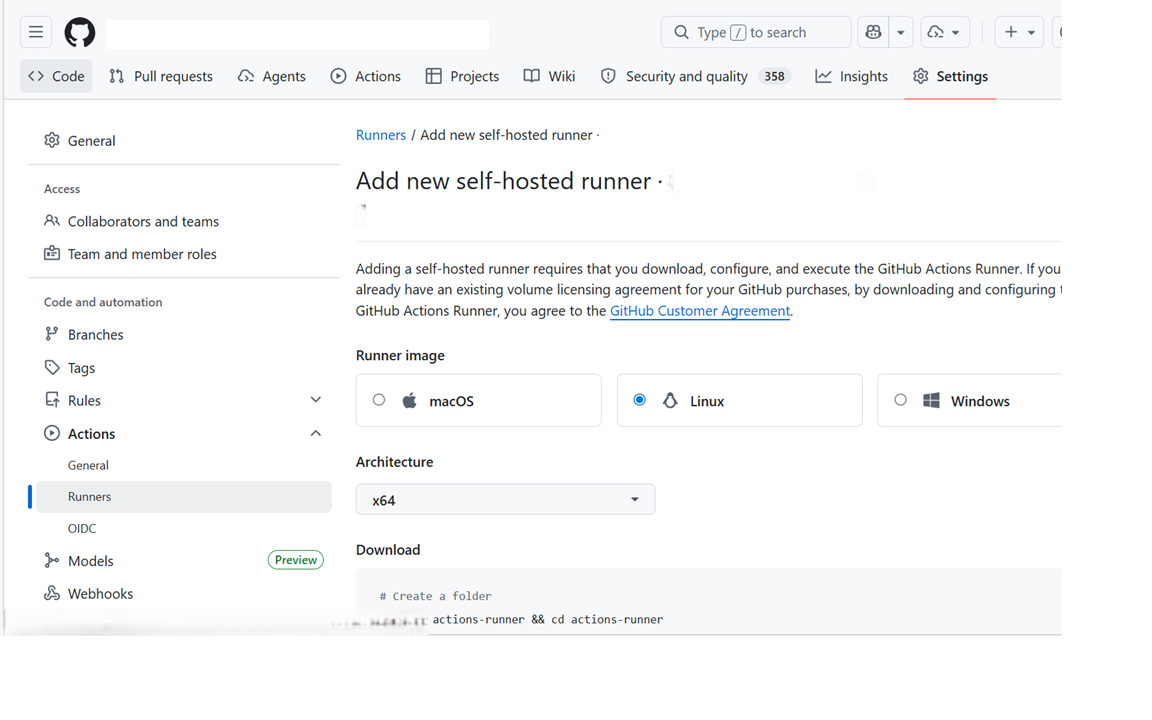
- Click New self-hosted runner.
- Select Linux as the operating system and X64 as the architecture.
- Run the commands shown by GitHub on your VM:
# Create a folder for the runner
mkdir actions-runner && cd actions-runner

# Download the latest runner package (use the exact URL GitHub shows you)
curl -o actions-runner-linux-x64.tar.gz -L https://github.com/actions/runner/releases/download/v<version>/actions-runner-linux-x64-<version>.tar.gz

# Extract the package
tar xzf ./actions-runner-linux-x64.tar.gz

# Configure the runner (use the exact token GitHub shows you)
./config.sh --url https://github.com/<your-org>/<your-repo> --token <YOUR_TOKEN>
Step 3 — Set Runner Labels
During the ./config.sh configuration step, GitHub will ask:
Enter the name of the runner group to add this runner to: [press Enter for Default]
Enter the name of runner: [your-runner-name]
This runner will have the following labels: 'self-hosted', 'Linux', 'X64'
Enter any additional labels (ex. label-1,label-2): [press Enter to skip]
When it asks for additional labels, enter a custom label that matches your workflow (e.g., lafbe for AKS, cli1 for EKS, gke-runner for GKE):
lafbe
This allows the pipeline to target this runner with:
runs-on: [self-hosted, Linux, X64, lafbe]
If you already registered the runner without the custom label, add it from: GitHub → Settings → Actions → Runners → Click your runner → Edit labels
Step 4 — Start the Runner
Option A: Run manually (for testing)
./run.sh
You will see:
√ Connected to GitHub
Listening for Jobs
Option B: Run as a system service (recommended for production)
# Install as a service
sudo ./svc.sh install

# Start the service
sudo ./svc.sh start

# Check service status
sudo ./svc.sh status
Running as a service ensures the runner starts automatically after a VM reboot.
Step 5 — Verify Runner is Online
Go to GitHub → Settings → Actions → Runners.
You should see your runner listed with status Idle (green dot):
✔ my-runner Idle self-hosted, Linux, X64, <your-label>
📷 Screenshot — Runner Online
5. Customize Branch Name and Runner Labels in Pipeline
How to Change the Branch Name
Open your workflow YAML file and find this section at the top:
on:
  push:
    branches:
      - main-copy        # ← CHANGE THIS to your branch name
Example: Multiple branches:
on:
  push:
    branches:
      - main
      - staging
      - production
How to Change the Self-Hosted Runner Labels
The runner labels are defined in the runs-on: field of each job:
jobs:
  deployInfra:
    runs-on: [self-hosted, Linux, X64, lafbe]   # ← CHANGE to your runner label

  buildImage:
    runs-on: [self-hosted, Linux, X64, lafbe]   # ← CHANGE to your runner label

  deploy:
    runs-on: [self-hosted, Linux, X64, lafbe]   # ← CHANGE to your runner label
The labels must exactly match what is registered on your self-hosted runner.
| Label | Meaning |
|---|---|
self-hosted |
Use a self-hosted runner (not GitHub-hosted) |
Linux |
Runner OS is Linux |
X64 |
Runner architecture is 64-bit |
lafbe / cli1 / gke-runner |
Custom label to target your specific runner |
All jobs must use the same
runs-onvalue, otherwise they may run on different machines and lose state.
6. GitHub Secrets & Variables Setup
What are GitHub Secrets and GitHub Variables?
GitHub provides two built-in mechanisms to pass configuration and credentials into your pipeline without hardcoding them in YAML files.
GitHub Secrets
A GitHub Secret is an encrypted, sensitive value stored securely at the repository (or organization) level. It is designed for credentials, tokens, keys, and any information that must never be exposed publicly.
How it works:
- You create a secret once in the GitHub UI.
- GitHub encrypts it immediately — even repository admins cannot read it back after saving.
- The pipeline reads it at runtime using
${{ secrets.SECRET_NAME }}. - In logs, GitHub automatically masks the value and replaces it with
***.
Example use cases:
- Cloud credentials (
AZURE_CLIENT_SECRET,AWS_SECRET_ACCESS_KEY,GCP_SA_KEY) - API keys and passwords
- Full content of
.envfiles
# How secrets are used inside a pipeline step
- name: Login to Azure
  run: |
    az login --service-principal \
      --username ${{ secrets.AZURE_CLIENT_ID }} \
      --password ${{ secrets.AZURE_CLIENT_SECRET }} \
      --tenant   ${{ secrets.AZURE_TENANT_ID }}
GitHub Variables
A GitHub Variable is a plain-text, non-sensitive configuration value stored at the repository (or organization) level. It is designed for values that can be seen publicly but you still don't want to hardcode inside YAML files (so you can change them in one place without editing code).
How it works:
- You create a variable once in the GitHub UI.
- The value is stored as plain text — it is not encrypted and not masked in logs.
- The pipeline reads it at runtime using
${{ vars.VARIABLE_NAME }}.
Example use cases:
- Registry URLs (
AZURE_CONTAINER_REGISTRY,ECR_REGISTRY) - Cluster names, resource groups, namespaces
- Deployment names, container names
# How variables are used inside the env: block
env:
  CLUSTER_NAME: ${{ vars.CLUSTER_NAME }}
  NAMESPACE:    ${{ vars.NAMESPACE }}
Key Differences at a Glance
| Feature | GitHub Secrets | GitHub Variables |
|---|---|---|
| Purpose | Sensitive credentials & keys | Non-sensitive configuration values |
| Encryption | Yes — encrypted at rest | No — stored as plain text |
| Visible in logs | No — masked as *** |
Yes — appears in plain text |
| Readable by admins | No — cannot be read back after saving | Yes — visible in GitHub UI |
| YAML syntax | ${{ secrets.NAME }} |
${{ vars.NAME }} |
| GitHub UI location | Settings → Secrets and variables → Actions | Settings → Secrets and variables → Variables |
| Examples | Client secret, SA key, .env file |
ACR name, cluster name, namespace |
How this pipeline uses both
┌─────────────────────────────────────────────────────────────┐
│                    GitHub Repository                        │
│                                                             │
│  ┌──────────────────────┐   ┌─────────────────────────┐    │
│  │   GitHub Variables   │   │    GitHub Secrets        │    │
│  │   (non-sensitive)    │   │    (sensitive)           │    │
│  │                      │   │                          │    │
│  │  CLUSTER_NAME        │   │  AZURE_CLIENT_SECRET     │    │
│  │  NAMESPACE           │   │  AWS_SECRET_ACCESS_KEY   │    │
│  │  ECR_REGISTRY  ...   │   │  GCP_SA_KEY  ...         │    │
│  └──────────┬───────────┘   └────────────┬────────────┘    │
│             │                            │                  │
│             └──────────────┬─────────────┘                  │
│                            ▼                               │
│                  ┌──────────────────┐                      │
│                  │  env: block in   │                      │
│                  │  workflow YAML   │                      │
│                  │  (central mapper)│                      │
│                  └────────┬─────────┘                      │
│                           ▼                               │
│              ${{ env.* }} used throughout pipeline        │
└─────────────────────────────────────────────────────────────┘
Rule of thumb: If you would be uncomfortable posting the value in a public chat message — use a Secret. If it's just a name or a URL — use a Variable.
The pipeline templates separate configuration into two categories to keep everything safe for public GitHub:
| Category | GitHub UI Path | Used for | Syntax in YAML |
|---|---|---|---|
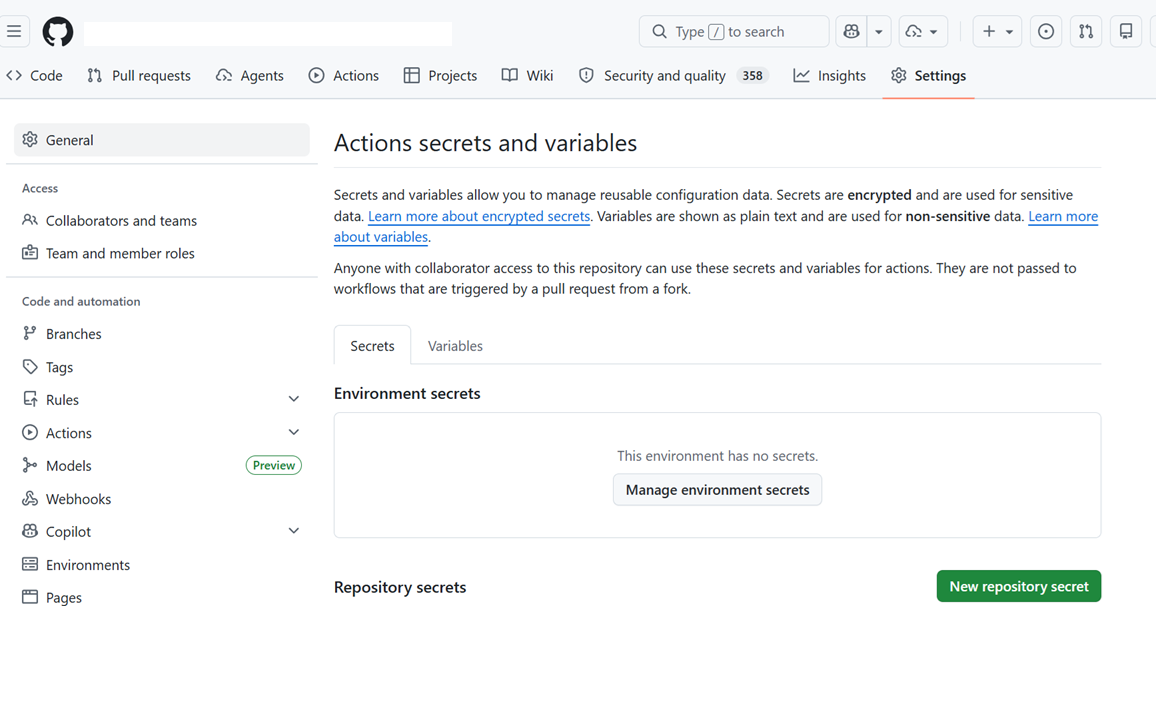
| Variables (non-sensitive) | Repo → Settings → Secrets and variables → Variables → New repository variable | Registry URLs, cluster names, namespaces, deploy names | ${{ vars.VAR_NAME }} |
| Secrets (sensitive) | Repo → Settings → Secrets and variables → Actions → New repository secret | Passwords, tokens, keys, .env file content |
${{ secrets.SECRET_NAME }} |
Nothing is hardcoded in the pipeline YAML — all values come from GitHub Variables or Secrets, making the workflow files fully safe to commit to a public repository.
📷 Screenshot — GitHub Variables & Secrets UI
Azure (AKS)
GitHub Variables (non-sensitive)
Go to: Repo → Settings → Secrets and variables → Variables → New repository variable
| Variable Name | Description | Example Value |
|---|---|---|
AZURE_CONTAINER_REGISTRY |
ACR login server URL | myregistry.azurecr.io |
RESOURCE_GROUP |
Azure Resource Group containing AKS | my-resource-group |
CLUSTER_NAME |
AKS cluster name | aks-my-cluster |
NAMESPACE |
Kubernetes namespace for the application | my-app-namespace |
DEPLOY_NAME |
Name of the Kubernetes Deployment object | my-deployment |
CONTAINER_NAME |
Name of the container inside the pod | my-container |
SHORT_NAME |
Short label used for ACR image tagging | my-app |
GitHub Secrets (sensitive)
Go to: Repo → Settings → Secrets and variables → Actions → New repository secret
| Secret Name | What to Put | Example |
|---|---|---|
AZURE_CLIENT_ID |
Service Principal Application (Client) ID | xxxxxxxx-xxxx-xxxx-xxxx-xxxxxxxxxxxx |
AZURE_CLIENT_SECRET |
Service Principal Client Secret | your-client-secret |
AZURE_TENANT_ID |
Azure Active Directory Tenant ID | xxxxxxxx-xxxx-xxxx-xxxx-xxxxxxxxxxxx |
AZURE_SUBSCRIPTION_ID |
Azure Subscription ID | xxxxxxxx-xxxx-xxxx-xxxx-xxxxxxxxxxxx |
APP_ENV_FILE |
Full content of your application .env file |
(see below) |
AWS (EKS)
GitHub Variables (non-sensitive)
| Variable Name | Description | Example Value |
|---|---|---|
ECR_REGISTRY |
ECR registry URL | 123456789012.dkr.ecr.us-east-1.amazonaws.com |
ECR_REPOSITORY |
ECR repository name | my-app-repo |
EKS_CLUSTER_NAME |
EKS cluster name | eks-my-cluster |
NAMESPACE |
Kubernetes namespace for the application | my-app-namespace |
DEPLOY_NAME |
Name of the Kubernetes Deployment object | my-deployment |
CONTAINER_NAME |
Name of the container inside the pod | my-container |
SHORT_NAME |
Short label used for ECR image tagging | my-app |
GitHub Secrets (sensitive)
| Secret Name | What to Put | Example |
|---|---|---|
AWS_ACCESS_KEY_ID |
IAM user Access Key ID | AKIAIOSFODNN7EXAMPLE |
AWS_SECRET_ACCESS_KEY |
IAM user Secret Access Key | wJalrXUtnFEMI/K7MDENG/... |
AWS_SESSION_TOKEN |
Session token (only if using temporary/assumed-role credentials) | AQoDYXdzEJ... |
AWS_REGION |
AWS region where ECR and EKS are hosted | us-east-1 |
APP_ENV_FILE |
Full content of your application .env file |
(see below) |
GCP (GKE)
GitHub Variables (non-sensitive)
| Variable Name | Description | Example Value |
|---|---|---|
GCP_PROJECT_ID |
GCP Project ID | my-project-123456 |
GKE_CLUSTER_NAME |
GKE cluster name | gke-my-cluster |
GKE_ZONE |
GKE cluster zone or region | us-central1-a |
ARTIFACT_REGISTRY |
Artifact Registry path | us-central1-docker.pkg.dev/my-project/my-repo |
NAMESPACE |
Kubernetes namespace for the application | my-app-namespace |
DEPLOY_NAME |
Name of the Kubernetes Deployment object | my-deployment |
CONTAINER_NAME |
Name of the container inside the pod | my-container |
SHORT_NAME |
Short label used for Artifact Registry image tagging | my-app |
GitHub Secrets (sensitive)
| Secret Name | What to Put | Example |
|---|---|---|
GCP_SA_KEY |
Base64-encoded Service Account JSON key | (retrieve from Vault — see below) |
APP_ENV_FILE_GCP |
Full content of your application .env file |
(see below) |
How to retrieve GCP_SA_KEY from HashiCorp Vault
The GCP Service Account JSON key is stored securely in the team's HashiCorp Vault. Follow these steps to retrieve it and add it as a GitHub secret.
Step 1 — Install Vault
Install the Vault software from your Company Portal (search for "Vault" or "HashiCorp Vault" in the portal and follow the installer).
Step 2 — Open a Command Prompt in the Vault folder and set environment variables
set VAULT_ADDR=https://<your-vault-server-address>
set VAULT_NAMESPACE=<your-vault-namespace>
Replace
<your-vault-server-address>and<your-vault-namespace>with the values provided by your DevOps/platform team.
Step 3 — Authenticate using AppRole
vault write auth/approle/login role_id="<your-role-id>" secret_id="<your-secret-id>"
Replace
<your-role-id>and<your-secret-id>with the AppRole credentials provided by your platform team. A token will be returned in the output.
Step 4 — Login with the token
Copy the token value from the output of Step 3, then run:
vault login <paste-your-token-here>
Step 5 — Retrieve the GCP Service Account JSON key
vault kv get <your-secret-path>/serviceAccountJson
Replace
<your-secret-path>with the Vault path provided by your team (e.g.,SA-vppcgcpaaa2022).
The JSON key content will be printed in the terminal.
Step 6 — Base64-encode the JSON key
Copy the JSON output and encode it:
On Linux/macOS:
echo '<paste-json-here>' | base64 -w 0
On Windows (PowerShell):
[Convert]::ToBase64String([System.Text.Encoding]::UTF8.GetBytes((Get-Content -Raw "service-account.json")))
Alternatively, save the JSON to a file first, then encode the file.
Step 7 — Add the base64 value as a GitHub Secret
- Go to your GitHub repository → Settings → Secrets and variables → Actions.
- Click New repository secret.
- Name:
GCP_SA_KEY - Value: paste the base64-encoded string from Step 6.
- Click Add secret.
How to set the environment file secret
Copy the entire content of your backend .env file and paste it as the secret value:
DATABASE_URL=postgres://user:password@host:5432/dbname
SECRET_KEY=your-secret-key
DEBUG=False
ALLOWED_HOSTS=*
REDIS_URL=redis://localhost:6379
The pipeline reads this secret, writes it to a file, and converts it into a Kubernetes secret named
app-env. Your pods then receive all these values as environment variables automatically.
How to encode the GCP Service Account key
cat your-service-account-key.json | base64 -w 0
Paste the output as the value of the GCP_SA_KEY secret.
7. Pipeline env: Block — How Variables Are Mapped
The env: block at the top of each workflow YAML is a central mapper — it reads values from GitHub Variables (vars.*) and GitHub Secrets (secrets.*) and exposes them as environment variables used throughout the pipeline.
You do not hardcode any values in the YAML file. Set them once in GitHub UI (Section 6 above) and the pipeline picks them up automatically.
How the env: block works
GitHub Variables (vars.*)  ──┐
                              ├──► env: block (mapper) ──► ${{ env.* }} used everywhere in the pipeline
GitHub Secrets (secrets.*) ──┘
Azure (AKS) — env: block
env:
  # Non-sensitive — pulled from GitHub Variables
  AZURE_CONTAINER_REGISTRY: ${{ vars.AZURE_CONTAINER_REGISTRY }}
  RESOURCE_GROUP:            ${{ vars.RESOURCE_GROUP }}
  CLUSTER_NAME:              ${{ vars.CLUSTER_NAME }}
  NAMESPACE:                 ${{ vars.NAMESPACE }}
  DEPLOY_NAME:               ${{ vars.DEPLOY_NAME }}
  CONTAINER_NAME:            ${{ vars.CONTAINER_NAME }}
  SHORT_NAME:                ${{ vars.SHORT_NAME }}

  # Fixed infrastructure values — no change needed
  INFRA_NAMESPACE_1: 'kafkatest'
  INFRA_NAMESPACE_2: 'iafv4'
  INFRA_PATH: 'k8s/infra/azure'
Sensitive values (
AZURE_CLIENT_ID,AZURE_CLIENT_SECRET,AZURE_TENANT_ID,AZURE_SUBSCRIPTION_ID,APP_ENV_FILE) are referenced directly fromsecrets.*inside individual pipeline steps — they do not appear in theenv:block.
AWS (EKS) — env: block
env:
  # Non-sensitive — pulled from GitHub Variables
  ECR_REGISTRY:     ${{ vars.ECR_REGISTRY }}
  ECR_REPOSITORY:   ${{ vars.ECR_REPOSITORY }}
  EKS_CLUSTER_NAME: ${{ vars.EKS_CLUSTER_NAME }}
  NAMESPACE:        ${{ vars.NAMESPACE }}
  DEPLOY_NAME:      ${{ vars.DEPLOY_NAME }}
  CONTAINER_NAME:   ${{ vars.CONTAINER_NAME }}
  SHORT_NAME:       ${{ vars.SHORT_NAME }}

  # Fixed infrastructure values — no change needed
  INFRA_NAMESPACE_1: 'kafkatest'
  INFRA_NAMESPACE_2: 'iafv4'
  INFRA_PATH: 'k8s/infra/aws'
Sensitive values (
AWS_ACCESS_KEY_ID,AWS_SECRET_ACCESS_KEY,AWS_SESSION_TOKEN,AWS_REGION,APP_ENV_FILE) are referenced directly fromsecrets.*inside individual pipeline steps.
GCP (GKE) — env: block
env:
  # Non-sensitive — pulled from GitHub Variables
  GCP_PROJECT_ID:    ${{ vars.GCP_PROJECT_ID }}
  GKE_CLUSTER_NAME:  ${{ vars.GKE_CLUSTER_NAME }}
  GKE_ZONE:          ${{ vars.GKE_ZONE }}
  ARTIFACT_REGISTRY: ${{ vars.ARTIFACT_REGISTRY }}
  NAMESPACE:         ${{ vars.NAMESPACE }}
  DEPLOY_NAME:       ${{ vars.DEPLOY_NAME }}
  CONTAINER_NAME:    ${{ vars.CONTAINER_NAME }}
  SHORT_NAME:        ${{ vars.SHORT_NAME }}

  # Fixed infrastructure values — no change needed
  INFRA_NAMESPACE_1: 'kafkatest'
  INFRA_NAMESPACE_2: 'iafv4'
  INFRA_PATH: 'k8s/infra/gcp'
Sensitive values (
GCP_SA_KEY,APP_ENV_FILE_GCP) are referenced directly fromsecrets.*inside individual pipeline steps.
Fixed infra variables (same across all clouds)
| Variable | Value | Purpose |
|---|---|---|
INFRA_NAMESPACE_1 |
kafkatest |
K8s namespace for Elasticsearch, OTel, Phoenix, Grafana |
INFRA_NAMESPACE_2 |
iafv4 |
K8s namespace for Redis |
INFRA_PATH |
k8s/infra/azure / k8s/infra/aws / k8s/infra/gcp |
Points to cloud-specific infra manifests with pre-configured LB annotations |
Change
INFRA_NAMESPACE_1andINFRA_NAMESPACE_2only if your Kubernetes manifests use different namespace names.INFRA_PATHshould not be changed — it is already set correctly per cloud template.
8. Dockerfile Setup
Your repository must have a Dockerfile at the root.
Minimal Dockerfile Example
FROM python:3.11-slim

WORKDIR /app

COPY requirements.txt .
RUN pip install --no-cache-dir -r requirements.txt

COPY . .

EXPOSE 8000

CMD ["python", "manage.py", "runserver", "0.0.0.0:8000"]
With .env build argument (optional, for build-time config):
FROM python:3.11-slim

WORKDIR /app

ARG ENV_FILE=.env
COPY ${ENV_FILE} .env

COPY requirements.txt .
RUN pip install --no-cache-dir -r requirements.txt

COPY . .

EXPOSE 8000

CMD ["python", "manage.py", "runserver", "0.0.0.0:8000"]
Note: The pipeline injects environment variables as a Kubernetes Secret at deploy time. The
.envapproach above is optional and used when the app needs the file at container startup.
9. Workflow File Setup
- In your repository, create the folder
.github/workflows/if it doesn't exist. - Inside it, create a workflow YAML file matching your target cloud:
- Azure:
.github/workflows/deploy-aks.yml - AWS:
.github/workflows/deploy-eks.yml - GCP:
.github/workflows/deploy-gke.yml - Paste the relevant YAML from Section 10 into that file.
- Update the
env:block values and branch name to match your setup. - Commit and push — the pipeline will trigger automatically.
Folder structure:
your-repo/
├── .github/
│   └── workflows/
│       ├── deploy-aks.yml    ← Azure
│       ├── deploy-eks.yml    ← AWS
│       └── deploy-gke.yml    ← GCP
├── k8s/
│   └── infra/
│       ├── iaf-es.yaml       ← Elasticsearch
│       ├── iaf-otel.yaml     ← OpenTelemetry Collector
│       ├── iaf-arpx.yaml     ← Phoenix (Arize)
│       ├── iaf-grafana.yaml  ← Grafana
│       └── iaf-redis.yaml    ← Redis
├── Dockerfile
├── requirements.txt
└── ...
10. Full Pipeline YAML — by Hyperscaler
10a. Azure — AKS
name: Build and Deploy to AKS

on:
  push:
    branches:
      - main-copy            # ← Change to your branch
  workflow_dispatch:
    inputs:
      image_version:
        description: 'Manual version input'
        required: false
        default: 'latest'

env:
  AZURE_CONTAINER_REGISTRY: myregistry.azurecr.io  # ← Update (e.g. myregistry.azurecr.io)
  RESOURCE_GROUP: my-resource-group                 # ← Update (e.g. my-resource-group)
  CLUSTER_NAME: my-aks-cluster                      # ← Update (e.g. my-aks-cluster)
  NAMESPACE: my-namespace                           # ← Update (e.g. my-namespace)
  DEPLOY_NAME: my-deployment                        # ← Update (e.g. my-deployment)
  CONTAINER_NAME: my-container                      # ← Update (e.g. my-container)
  SHORT_NAME: my-app                                # ← Update (e.g. my-app)

jobs:

  deployInfra:
    name: Deploy Infrastructure Services
    runs-on: [self-hosted, Linux, X64, my-runner]    # ← Update runner label
    permissions:
      contents: read
    outputs:
      ELASTICSEARCH_IP:  ${{ steps.collect_ips.outputs.ELASTICSEARCH_IP }}
      OTEL_COLLECTOR_IP: ${{ steps.collect_ips.outputs.OTEL_COLLECTOR_IP }}
      PHOENIX_IP:        ${{ steps.collect_ips.outputs.PHOENIX_IP }}
      GRAFANA_IP:        ${{ steps.collect_ips.outputs.GRAFANA_IP }}
      REDIS_IP:          ${{ steps.collect_ips.outputs.REDIS_IP }}
    steps:
      - name: Checkout source code
        uses: actions/checkout@v4

      - name: Azure login
        shell: bash
        env:
          REQUESTS_CA_BUNDLE: /etc/ssl/certs/ca-bundle.crt
          SSL_CERT_FILE: /etc/ssl/certs/ca-bundle.crt
        run: |
          az logout || true
          az account clear || true
          az login --service-principal \
            --username "${{ secrets.AZURE_CLIENT_ID }}" \
            --password "${{ secrets.AZURE_CLIENT_SECRET }}" \
            --tenant "${{ secrets.AZURE_TENANT_ID }}"
          az account set --subscription "${{ secrets.AZURE_SUBSCRIPTION_ID }}"

      - name: Set up kubelogin
        uses: azure/use-kubelogin@v1
        with:
          kubelogin-version: 'v0.0.25'

      - name: Get K8s context
        uses: azure/aks-set-context@v3
        with:
          resource-group: ${{ env.RESOURCE_GROUP }}
          cluster-name: ${{ env.CLUSTER_NAME }}
          admin: 'false'
          use-kubelogin: 'true'

      - name: Ensure Infra Namespaces Exist
        run: |
          kubectl create namespace kafkatest --dry-run=client -o yaml | kubectl apply -f -
          kubectl create namespace iafv4    --dry-run=client -o yaml | kubectl apply -f -

      - name: Apply Elasticsearch
        run: |
          if kubectl get statefulset elasticsearch -n kafkatest > /dev/null 2>&1; then
            echo "INFO: Elasticsearch already exists — skipping."
          else
            kubectl apply -f k8s/infra/azure/iaf-es.yaml
          fi

      - name: Wait for Elasticsearch IP
        id: wait_es_ip
        run: |
          IP=""
          for i in $(seq 1 36); do
            IP=$(kubectl get svc elasticsearch -n kafkatest \
                  -o jsonpath='{.status.loadBalancer.ingress[0].ip}' 2>/dev/null || true)
            [ -n "$IP" ] && break
            echo "Attempt $i/36 — retrying in 10s..."
            sleep 10
          done
          [ -n "$IP" ] || { echo "ERROR: Could not get Elasticsearch IP."; exit 1; }
          echo "ELASTICSEARCH_IP=$IP" >> "$GITHUB_OUTPUT"

      - name: Apply OpenTelemetry Collector
        run: |
          ES_IP="${{ steps.wait_es_ip.outputs.ELASTICSEARCH_IP }}"
          if kubectl get deployment opentelemetry-collector -n kafkatest > /dev/null 2>&1; then
            echo "INFO: OpenTelemetry Collector already exists — skipping."
          else
            sed "s|ELASTICSEARCH_ENDPOINT|${ES_IP}|g" k8s/infra/azure/iaf-otel.yaml | kubectl apply -f -
          fi

      - name: Apply Phoenix (Arize)
        run: |
          kubectl get deployment phoenix -n kafkatest > /dev/null 2>&1 || kubectl apply -f k8s/infra/azure/iaf-arpx.yaml

      - name: Apply Grafana
        run: |
          kubectl get deployment grafana -n kafkatest > /dev/null 2>&1 || kubectl apply -f k8s/infra/azure/iaf-grafana.yaml

      - name: Apply Redis
        run: |
          kubectl get deployment redis -n iafv4 > /dev/null 2>&1 || kubectl apply -f k8s/infra/azure/iaf-redis.yaml

      - name: Wait for All Infra Service IPs
        id: collect_ips
        run: |
          wait_for_ip() {
            local SVC="$1" NS="$2" VAR="$3" IP=""
            for i in $(seq 1 36); do
              IP=$(kubectl get svc "$SVC" -n "$NS" \
                    -o jsonpath='{.status.loadBalancer.ingress[0].ip}' 2>/dev/null || true)
              [ -n "$IP" ] && break
              echo "Attempt $i/36 — retrying in 10s..."
              sleep 10
            done
            echo "$VAR=${IP:-UNKNOWN}" >> "$GITHUB_OUTPUT"
          }
          wait_for_ip "elasticsearch"           "kafkatest" "ELASTICSEARCH_IP"
          wait_for_ip "opentelemetry-collector" "kafkatest" "OTEL_COLLECTOR_IP"
          wait_for_ip "phoenix"                 "kafkatest" "PHOENIX_IP"
          wait_for_ip "grafana"                 "kafkatest" "GRAFANA_IP"
          wait_for_ip "redis"                   "iafv4"     "REDIS_IP"

  buildImage:
    name: Build and Push Docker Image
    needs: deployInfra
    runs-on: [self-hosted, Linux, X64, my-runner]    # ← Update runner label
    permissions:
      contents: read
      id-token: write
    steps:
      - name: Checkout code
        uses: actions/checkout@v4

      - name: Azure login
        shell: bash
        env:
          REQUESTS_CA_BUNDLE: /etc/ssl/certs/ca-bundle.crt
          SSL_CERT_FILE: /etc/ssl/certs/ca-bundle.crt
        run: |
          az logout || true
          az account clear || true
          az login --service-principal \
            --username "${{ secrets.AZURE_CLIENT_ID }}" \
            --password "${{ secrets.AZURE_CLIENT_SECRET }}" \
            --tenant "${{ secrets.AZURE_TENANT_ID }}"
          az account set --subscription "${{ secrets.AZURE_SUBSCRIPTION_ID }}"

      - name: Build and Push Docker Image to ACR
        run: |
          ACR_IMG="${{ env.AZURE_CONTAINER_REGISTRY }}/${{ env.SHORT_NAME }}:${{ github.sha }}"
          unset HTTP_PROXY HTTPS_PROXY
          az acr login --name $(echo "${{ env.AZURE_CONTAINER_REGISTRY }}" | cut -d. -f1)
          docker build --shm-size=8g -t "$ACR_IMG" .
          docker push "$ACR_IMG"

  deploy:
    name: Deploy to AKS
    needs: [deployInfra, buildImage]
    runs-on: [self-hosted, Linux, X64, my-runner]    # ← Update runner label
    permissions:
      actions: read
      contents: read
    steps:
      - name: Checkout source code
        uses: actions/checkout@v4

      - name: Azure login
        shell: bash
        env:
          REQUESTS_CA_BUNDLE: /etc/ssl/certs/ca-bundle.crt
          SSL_CERT_FILE: /etc/ssl/certs/ca-bundle.crt
        run: |
          az logout || true
          az account clear || true
          az login --service-principal \
            --username "${{ secrets.AZURE_CLIENT_ID }}" \
            --password "${{ secrets.AZURE_CLIENT_SECRET }}" \
            --tenant "${{ secrets.AZURE_TENANT_ID }}"
          az account set --subscription "${{ secrets.AZURE_SUBSCRIPTION_ID }}"

      - name: Set up kubelogin
        uses: azure/use-kubelogin@v1
        with:
          kubelogin-version: 'v0.0.25'

      - name: Get K8s context
        uses: azure/aks-set-context@v3
        with:
          resource-group: ${{ env.RESOURCE_GROUP }}
          cluster-name: ${{ env.CLUSTER_NAME }}
          admin: 'false'
          use-kubelogin: 'true'

      - name: Ensure App Namespace Exists
        run: |
          kubectl create namespace ${{ env.NAMESPACE }} --dry-run=client -o yaml | kubectl apply -f -

      - name: Create/Update Kubernetes Secret (with Infra IPs injected)
        env:
          ENV_FILE_CONTENT: ${{ secrets.APP_ENV_FILE_AZURE }}
          ELASTICSEARCH_IP:  ${{ needs.deployInfra.outputs.ELASTICSEARCH_IP }}
          OTEL_COLLECTOR_IP: ${{ needs.deployInfra.outputs.OTEL_COLLECTOR_IP }}
          PHOENIX_IP:        ${{ needs.deployInfra.outputs.PHOENIX_IP }}
          GRAFANA_IP:        ${{ needs.deployInfra.outputs.GRAFANA_IP }}
          REDIS_IP:          ${{ needs.deployInfra.outputs.REDIS_IP }}
        run: |
          [ -z "$ENV_FILE_CONTENT" ] && { echo "ERROR: APP_ENV_FILE_AZURE is empty."; exit 1; }
          printf "%s" "$ENV_FILE_CONTENT" > .env.temp
          awk -F= '!seen[$1]++' .env.temp > .env.cleaned
          sed 's/^[[:space:]]*//; s/[[:space:]]*=[[:space:]]*/=/; s/="\(.*\)"$/=\1/; /^$/d; /^#/d' .env.cleaned > .env.k8s
          printf '%s\n' \
            "PHOENIX_COLLECTOR_ENDPOINT=http://${PHOENIX_IP}:6006" \
            "REDIS_HOST=${REDIS_IP}" \
            "REDIS_PORT=6379" \
            "OTEL_EXPORTER_OTLP_TRACES_ENDPOINT=http://${OTEL_COLLECTOR_IP}:4318/v1/traces" \
            "OTEL_EXPORTER_OTLP_LOGS_ENDPOINT_HTTP=http://${OTEL_COLLECTOR_IP}:4320/v1/logs" \
            "OTEL_EXPORTER_OTLP_LOGS_ENDPOINT_GRPC=${OTEL_COLLECTOR_IP}:4319" \
            "ELASTICSEARCH_URL=http://${ELASTICSEARCH_IP}:9200" \
            "GRAFANA_URL=http://${GRAFANA_IP}:3000" >> .env.k8s
          tac .env.k8s | awk -F= '!seen[$1]++' | tac > .env.final
          mv .env.final .env.k8s
          kubectl create secret generic app-env \
            --from-env-file=.env.k8s \
            -n ${{ env.NAMESPACE }} --dry-run=client -o yaml | kubectl apply -f -
          rm -f .env.temp .env.cleaned .env.k8s

      - name: Check if Deployment Exists and Deploy
        run: |
          VAR_IMAGE="${{ env.AZURE_CONTAINER_REGISTRY }}/${{ env.SHORT_NAME }}:${{ github.sha }}"
          if kubectl get deployment ${{ env.DEPLOY_NAME }} -n ${{ env.NAMESPACE }} > /dev/null 2>&1; then
            echo "=== Deployment exists. Updating image ==="
            kubectl set image deployment/${{ env.DEPLOY_NAME }} \
              ${{ env.CONTAINER_NAME }}="$VAR_IMAGE" \
              -n ${{ env.NAMESPACE }}
          else
            echo "=== First-time deployment ==="
            cat <<EOF | kubectl apply -f -
          apiVersion: apps/v1
          kind: Deployment
          metadata:
            name: ${{ env.DEPLOY_NAME }}
            namespace: ${{ env.NAMESPACE }}
          spec:
            replicas: 1
            selector:
              matchLabels:
                app: ${{ env.DEPLOY_NAME }}
            template:
              metadata:
                labels:
                  app: ${{ env.DEPLOY_NAME }}
              spec:
                containers:
                  - name: ${{ env.CONTAINER_NAME }}
                    image: ${VAR_IMAGE}
                    ports:
                      - containerPort: 8000
                    envFrom:
                      - secretRef:
                          name: app-env
                    resources:
                      requests:
                        memory: "512Mi"
                        cpu: "250m"
                      limits:
                        memory: "2Gi"
                        cpu: "1000m"
          ---
          apiVersion: v1
          kind: Service
          metadata:
            name: ${{ env.DEPLOY_NAME }}
            namespace: ${{ env.NAMESPACE }}
            annotations:
              service.beta.kubernetes.io/azure-load-balancer-internal: "true"
          spec:
            selector:
              app: ${{ env.DEPLOY_NAME }}
            ports:
              - protocol: TCP
                port: 8000
                targetPort: 8000
            type: LoadBalancer
          EOF
          fi

      - name: Wait and Check Deployment
        run: |
          kubectl rollout status deployment/${{ env.DEPLOY_NAME }} -n ${{ env.NAMESPACE }} --timeout=5m
          kubectl get pods -n ${{ env.NAMESPACE }} -l app=${{ env.DEPLOY_NAME }}
          kubectl get svc  -n ${{ env.NAMESPACE }} ${{ env.DEPLOY_NAME }}

      - name: Debug on Failure
        if: failure()
        run: |
          kubectl get pods -n ${{ env.NAMESPACE }} -o wide
          kubectl get events -n ${{ env.NAMESPACE }} --sort-by='.lastTimestamp' | tail -n 30
          POD=$(kubectl get pods -n ${{ env.NAMESPACE }} -l app=${{ env.DEPLOY_NAME }} -o jsonpath="{.items[0].metadata.name}")
          [ -n "$POD" ] && kubectl logs "$POD" -n ${{ env.NAMESPACE }} --tail=100 || true
10b. AWS — EKS
name: Build and Deploy to EKS

on:
  push:
    branches:
      - main                  # ← Change to your branch
  workflow_dispatch:
    inputs:
      image_version:
        description: 'Manual version input'
        required: false
        default: 'latest'

env:
  ECR_REGISTRY: 123456789012.dkr.ecr.us-east-1.amazonaws.com   # ← Update (your AWS account ID + region)
  ECR_REPOSITORY: my-ecr-repository                             # ← Update (e.g. my-ecr-repository)
  EKS_CLUSTER_NAME: my-eks-cluster                              # ← Update (e.g. my-eks-cluster)
  NAMESPACE: my-namespace                                        # ← Update (e.g. my-namespace)
  DEPLOY_NAME: my-deployment                                     # ← Update (e.g. my-deployment)
  CONTAINER_NAME: my-container                                   # ← Update (e.g. my-container)
  SHORT_NAME: my-app                                             # ← Update (e.g. my-app)

jobs:

  deployInfra:
    name: Deploy Infrastructure Services
    runs-on: [self-hosted, Linux, X64, my-runner]   # ← Update runner label
    permissions:
      contents: read
    outputs:
      ELASTICSEARCH_IP:  ${{ steps.collect_ips.outputs.ELASTICSEARCH_IP }}
      OTEL_COLLECTOR_IP: ${{ steps.collect_ips.outputs.OTEL_COLLECTOR_IP }}
      PHOENIX_IP:        ${{ steps.collect_ips.outputs.PHOENIX_IP }}
      GRAFANA_IP:        ${{ steps.collect_ips.outputs.GRAFANA_IP }}
      REDIS_IP:          ${{ steps.collect_ips.outputs.REDIS_IP }}
    steps:
      - name: Checkout source code
        uses: actions/checkout@v4

      - name: Configure AWS credentials
        uses: aws-actions/configure-aws-credentials@v3
        with:
          aws-access-key-id: ${{ secrets.AWS_ACCESS_KEY_ID }}
          aws-secret-access-key: ${{ secrets.AWS_SECRET_ACCESS_KEY }}
          aws-session-token: ${{ secrets.AWS_SESSION_TOKEN }}
          aws-region: ${{ secrets.AWS_REGION }}

      - name: Update kubeconfig for EKS
        run: |
          sudo aws eks update-kubeconfig --name ${{ env.EKS_CLUSTER_NAME }} --region ${{ secrets.AWS_REGION }}

      - name: Ensure Infra Namespaces Exist
        run: |
          kubectl create namespace kafkatest --dry-run=client -o yaml | kubectl apply -f -
          kubectl create namespace iafv4    --dry-run=client -o yaml | kubectl apply -f -

      - name: Apply Elasticsearch
        run: |
          if kubectl get statefulset elasticsearch -n kafkatest > /dev/null 2>&1; then
            echo "INFO: Elasticsearch already exists — skipping."
          else
            kubectl apply -f k8s/infra/aws/iaf-es.yaml
          fi

      - name: Wait for Elasticsearch Hostname
        id: wait_es_ip
        run: |
          EP=""
          for i in $(seq 1 36); do
            EP=$(kubectl get svc elasticsearch -n kafkatest \
                  -o jsonpath='{.status.loadBalancer.ingress[0].hostname}' 2>/dev/null || true)
            [ -n "$EP" ] && break
            echo "Attempt $i/36 — retrying in 10s..."
            sleep 10
          done
          [ -n "$EP" ] || { echo "ERROR: Could not get Elasticsearch hostname."; exit 1; }
          echo "ELASTICSEARCH_IP=$EP" >> "$GITHUB_OUTPUT"

      - name: Apply OpenTelemetry Collector
        run: |
          ES_IP="${{ steps.wait_es_ip.outputs.ELASTICSEARCH_IP }}"
          if kubectl get deployment opentelemetry-collector -n kafkatest > /dev/null 2>&1; then
            echo "INFO: OpenTelemetry Collector already exists — skipping."
          else
            sed "s|ELASTICSEARCH_ENDPOINT|${ES_IP}|g" k8s/infra/aws/iaf-otel.yaml | kubectl apply -f -
          fi

      - name: Apply Phoenix (Arize)
        run: |
          kubectl get deployment phoenix -n kafkatest > /dev/null 2>&1 || kubectl apply -f k8s/infra/aws/iaf-arpx.yaml

      - name: Apply Grafana
        run: |
          kubectl get deployment grafana -n kafkatest > /dev/null 2>&1 || kubectl apply -f k8s/infra/aws/iaf-grafana.yaml

      - name: Apply Redis
        run: |
          kubectl get deployment redis -n iafv4 > /dev/null 2>&1 || kubectl apply -f k8s/infra/aws/iaf-redis.yaml

      - name: Wait for All Infra Service Hostnames
        id: collect_ips
        run: |
          wait_for_ep() {
            local SVC="$1" NS="$2" VAR="$3" EP=""
            for i in $(seq 1 36); do
              EP=$(kubectl get svc "$SVC" -n "$NS" \
                    -o jsonpath='{.status.loadBalancer.ingress[0].hostname}' 2>/dev/null || true)
              [ -n "$EP" ] && break
              echo "Attempt $i/36 — retrying in 10s..."
              sleep 10
            done
            echo "$VAR=${EP:-UNKNOWN}" >> "$GITHUB_OUTPUT"
          }
          wait_for_ep "elasticsearch"           "kafkatest" "ELASTICSEARCH_IP"
          wait_for_ep "opentelemetry-collector" "kafkatest" "OTEL_COLLECTOR_IP"
          wait_for_ep "phoenix"                 "kafkatest" "PHOENIX_IP"
          wait_for_ep "grafana"                 "kafkatest" "GRAFANA_IP"
          wait_for_ep "redis"                   "iafv4"     "REDIS_IP"

  buildImage:
    name: Build and Push Docker Image
    needs: deployInfra
    runs-on: [self-hosted, Linux, X64, my-runner]   # ← Update runner label
    permissions:
      contents: read
      id-token: write
    steps:
      - name: Checkout code
        uses: actions/checkout@v4

      - name: Configure AWS credentials
        uses: aws-actions/configure-aws-credentials@v3
        with:
          aws-access-key-id: ${{ secrets.AWS_ACCESS_KEY_ID }}
          aws-secret-access-key: ${{ secrets.AWS_SECRET_ACCESS_KEY }}
          aws-session-token: ${{ secrets.AWS_SESSION_TOKEN }}
          aws-region: ${{ secrets.AWS_REGION }}

      - name: Write .env file from secret
        run: echo "${{ secrets.IAF_BACKEND_ENV }}" > .env

      - name: Build Docker image
        run: |
          sudo docker build \
            --build-arg ENV_FILE=.env \
            -t ${{ env.ECR_REGISTRY }}/${{ env.ECR_REPOSITORY }}:${{ github.sha }} .

      - name: Login to AWS ECR
        run: |
          sudo aws ecr get-login-password --region "${{ secrets.AWS_REGION }}" | \
            sudo docker login --username AWS --password-stdin "${{ env.ECR_REGISTRY }}"

      - name: Push Docker image to ECR
        run: |
          sudo docker push ${{ env.ECR_REGISTRY }}/${{ env.ECR_REPOSITORY }}:${{ github.sha }}

  deploy:
    name: Deploy to EKS
    needs: [deployInfra, buildImage]
    runs-on: [self-hosted, Linux, X64, my-runner]   # ← Update runner label
    permissions:
      actions: read
      contents: read
    steps:
      - name: Checkout source code
        uses: actions/checkout@v4

      - name: Configure AWS credentials
        uses: aws-actions/configure-aws-credentials@v3
        with:
          aws-access-key-id: ${{ secrets.AWS_ACCESS_KEY_ID }}
          aws-secret-access-key: ${{ secrets.AWS_SECRET_ACCESS_KEY }}
          aws-session-token: ${{ secrets.AWS_SESSION_TOKEN }}
          aws-region: ${{ secrets.AWS_REGION }}

      - name: Update kubeconfig for EKS
        run: |
          sudo aws eks update-kubeconfig --name ${{ env.EKS_CLUSTER_NAME }} --region ${{ secrets.AWS_REGION }}

      - name: Ensure Namespace Exists
        run: |
          kubectl get namespace ${{ env.NAMESPACE }} > /dev/null 2>&1 || \
            kubectl create namespace ${{ env.NAMESPACE }}

      - name: Create/Update Kubernetes Secret (with Infra Endpoints injected)
        env:
          ENV_FILE_CONTENT: ${{ secrets.IAF_BACKEND_ENV }}
          ELASTICSEARCH_IP:  ${{ needs.deployInfra.outputs.ELASTICSEARCH_IP }}
          OTEL_COLLECTOR_IP: ${{ needs.deployInfra.outputs.OTEL_COLLECTOR_IP }}
          PHOENIX_IP:        ${{ needs.deployInfra.outputs.PHOENIX_IP }}
          GRAFANA_IP:        ${{ needs.deployInfra.outputs.GRAFANA_IP }}
          REDIS_IP:          ${{ needs.deployInfra.outputs.REDIS_IP }}
        run: |
          [ -z "$ENV_FILE_CONTENT" ] && { echo "ERROR: IAF_BACKEND_ENV is empty."; exit 1; }
          printf "%s" "$ENV_FILE_CONTENT" > .env.temp
          awk -F= '!seen[$1]++' .env.temp > .env.cleaned
          sed 's/^[[:space:]]*//; s/[[:space:]]*=[[:space:]]*/=/; s/="\(.*\)"$/=\1/; /^$/d; /^#/d' .env.cleaned > .env.k8s
          printf '%s\n' \
            "PHOENIX_COLLECTOR_ENDPOINT=http://${PHOENIX_IP}:6006" \
            "REDIS_HOST=${REDIS_IP}" \
            "REDIS_PORT=6379" \
            "OTEL_EXPORTER_OTLP_TRACES_ENDPOINT=http://${OTEL_COLLECTOR_IP}:4318/v1/traces" \
            "OTEL_EXPORTER_OTLP_LOGS_ENDPOINT_HTTP=http://${OTEL_COLLECTOR_IP}:4320/v1/logs" \
            "OTEL_EXPORTER_OTLP_LOGS_ENDPOINT_GRPC=${OTEL_COLLECTOR_IP}:4319" \
            "ELASTICSEARCH_URL=http://${ELASTICSEARCH_IP}:9200" \
            "GRAFANA_URL=http://${GRAFANA_IP}:3000" >> .env.k8s
          tac .env.k8s | awk -F= '!seen[$1]++' | tac > .env.final
          mv .env.final .env.k8s
          kubectl create secret generic app-env \
            --from-env-file=.env.k8s \
            -n ${{ env.NAMESPACE }} --dry-run=client -o yaml | kubectl apply -f -
          rm -f .env.temp .env.cleaned .env.k8s

      - name: Check if Deployment Exists and Deploy
        run: |
          VAR_IMAGE="${{ env.ECR_REGISTRY }}/${{ env.ECR_REPOSITORY }}:${{ github.sha }}"
          export VAR_IMAGE
          if kubectl get deployment ${{ env.DEPLOY_NAME }} -n ${{ env.NAMESPACE }} > /dev/null 2>&1; then
            echo "=== Deployment exists. Updating image ==="
            kubectl set image deployment/${{ env.DEPLOY_NAME }} \
              ${{ env.CONTAINER_NAME }}="$VAR_IMAGE" \
              -n ${{ env.NAMESPACE }}
          else
            echo "=== First-time deployment ==="
            envsubst <<'EOF' | kubectl apply -f -
          apiVersion: apps/v1
          kind: Deployment
          metadata:
            name: ${{ env.DEPLOY_NAME }}
            namespace: ${{ env.NAMESPACE }}
          spec:
            replicas: 1
            selector:
              matchLabels:
                app: ${{ env.DEPLOY_NAME }}
            template:
              metadata:
                labels:
                  app: ${{ env.DEPLOY_NAME }}
              spec:
                containers:
                  - name: ${{ env.CONTAINER_NAME }}
                    image: ${VAR_IMAGE}
                    ports:
                      - containerPort: 8000
                    envFrom:
                      - secretRef:
                          name: app-env
                    resources:
                      requests:
                        memory: "512Mi"
                        cpu: "250m"
                      limits:
                        memory: "2Gi"
                        cpu: "1000m"
          ---
          apiVersion: v1
          kind: Service
          metadata:
            name: ${{ env.DEPLOY_NAME }}
            namespace: ${{ env.NAMESPACE }}
            annotations:
              service.beta.kubernetes.io/aws-load-balancer-internal: "true"
              service.beta.kubernetes.io/aws-load-balancer-source-ranges: "<ALLOWED_CIDR_RANGES>"
          spec:
            selector:
              app: ${{ env.DEPLOY_NAME }}
            ports:
              - protocol: TCP
                port: 8000
                targetPort: 8000
            type: LoadBalancer
          EOF
          fi

      - name: Wait and Check Deployment
        run: |
          kubectl rollout status deployment/${{ env.DEPLOY_NAME }} -n ${{ env.NAMESPACE }} --timeout=5m
          kubectl get pods -n ${{ env.NAMESPACE }} -l app=${{ env.DEPLOY_NAME }}
          kubectl get svc  -n ${{ env.NAMESPACE }} ${{ env.DEPLOY_NAME }}

      - name: Debug on Failure
        if: failure()
        run: |
          kubectl get pods -n ${{ env.NAMESPACE }} -o wide
          kubectl get events -n ${{ env.NAMESPACE }} --sort-by='.lastTimestamp' | tail -n 30
          POD=$(kubectl get pods -n ${{ env.NAMESPACE }} -l app=${{ env.DEPLOY_NAME }} -o jsonpath="{.items[0].metadata.name}")
          [ -n "$POD" ] && kubectl logs "$POD" -n ${{ env.NAMESPACE }} --tail=100 || true
10c. GCP — GKE
name: Build and Deploy to GKE

on:
  push:
    branches:
      - main                  # ← Change to your branch
  workflow_dispatch:
    inputs:
      image_version:
        description: 'Manual version input'
        required: false
        default: 'latest'

env:
  GAR_LOCATION: us-east1                           # ← Update (e.g. us-east1, europe-west1)
  GAR_REPOSITORY: my-gar-repository                # ← Update (e.g. my-gar-repository)
  GKE_CLUSTER: my-gke-cluster                      # ← Update (e.g. my-gke-cluster)
  GKE_ZONE: us-east1-b                             # ← Update (e.g. us-east1-b)
  NAMESPACE: my-namespace                          # ← Update (e.g. my-namespace)
  DEPLOY_NAME: my-deployment                       # ← Update (e.g. my-deployment)
  CONTAINER_NAME: my-container                     # ← Update (e.g. my-container)
  SHORT_NAME: my-app                               # ← Update (e.g. my-app)

jobs:

  deployInfra:
    name: Deploy Infrastructure Services
    runs-on: [self-hosted, Linux, X64, my-runner]  # ← Update runner label
    permissions:
      contents: read
    outputs:
      ELASTICSEARCH_IP:  ${{ steps.collect_ips.outputs.ELASTICSEARCH_IP }}
      OTEL_COLLECTOR_IP: ${{ steps.collect_ips.outputs.OTEL_COLLECTOR_IP }}
      PHOENIX_IP:        ${{ steps.collect_ips.outputs.PHOENIX_IP }}
      GRAFANA_IP:        ${{ steps.collect_ips.outputs.GRAFANA_IP }}
      REDIS_IP:          ${{ steps.collect_ips.outputs.REDIS_IP }}
    steps:
      - name: Checkout source code
        uses: actions/checkout@v4

      - name: Authenticate to Google Cloud
        uses: google-github-actions/auth@v2
        with:
          credentials_json: ${{ secrets.GCP_SA_KEY }}

      - name: Get GKE credentials
        uses: google-github-actions/get-gke-credentials@v2
        with:
          cluster_name: ${{ env.GKE_CLUSTER }}
          location: ${{ env.GKE_ZONE }}
          project_id: ${{ secrets.GCP_PROJECT_ID }}

      - name: Ensure Infra Namespaces Exist
        run: |
          kubectl create namespace kafkatest --dry-run=client -o yaml | kubectl apply -f -
          kubectl create namespace iafv4    --dry-run=client -o yaml | kubectl apply -f -

      - name: Apply Elasticsearch
        run: |
          if kubectl get statefulset elasticsearch -n kafkatest > /dev/null 2>&1; then
            echo "INFO: Elasticsearch already exists — skipping."
          else
            kubectl apply -f k8s/infra/gcp/iaf-es.yaml
          fi

      - name: Wait for Elasticsearch IP
        id: wait_es_ip
        run: |
          IP=""
          for i in $(seq 1 36); do
            IP=$(kubectl get svc elasticsearch -n kafkatest \
                  -o jsonpath='{.status.loadBalancer.ingress[0].ip}' 2>/dev/null || true)
            [ -n "$IP" ] && break
            echo "Attempt $i/36 — retrying in 10s..."
            sleep 10
          done
          [ -n "$IP" ] || { echo "ERROR: Could not get Elasticsearch IP."; exit 1; }
          echo "ELASTICSEARCH_IP=$IP" >> "$GITHUB_OUTPUT"

      - name: Apply OpenTelemetry Collector
        run: |
          ES_IP="${{ steps.wait_es_ip.outputs.ELASTICSEARCH_IP }}"
          if kubectl get deployment opentelemetry-collector -n kafkatest > /dev/null 2>&1; then
            echo "INFO: OpenTelemetry Collector already exists — skipping."
          else
            sed "s|ELASTICSEARCH_ENDPOINT|${ES_IP}|g" k8s/infra/gcp/iaf-otel.yaml | kubectl apply -f -
          fi

      - name: Apply Phoenix (Arize)
        run: |
          kubectl get deployment phoenix -n kafkatest > /dev/null 2>&1 || kubectl apply -f k8s/infra/gcp/iaf-arpx.yaml

      - name: Apply Grafana
        run: |
          kubectl get deployment grafana -n kafkatest > /dev/null 2>&1 || kubectl apply -f k8s/infra/gcp/iaf-grafana.yaml

      - name: Apply Redis
        run: |
          kubectl get deployment redis -n iafv4 > /dev/null 2>&1 || kubectl apply -f k8s/infra/gcp/iaf-redis.yaml

      - name: Wait for All Infra Service IPs
        id: collect_ips
        run: |
          wait_for_ip() {
            local SVC="$1" NS="$2" VAR="$3" IP=""
            for i in $(seq 1 36); do
              IP=$(kubectl get svc "$SVC" -n "$NS" \
                    -o jsonpath='{.status.loadBalancer.ingress[0].ip}' 2>/dev/null || true)
              [ -n "$IP" ] && break
              echo "Attempt $i/36 — retrying in 10s..."
              sleep 10
            done
            echo "$VAR=${IP:-UNKNOWN}" >> "$GITHUB_OUTPUT"
          }
          wait_for_ip "elasticsearch"           "kafkatest" "ELASTICSEARCH_IP"
          wait_for_ip "opentelemetry-collector" "kafkatest" "OTEL_COLLECTOR_IP"
          wait_for_ip "phoenix"                 "kafkatest" "PHOENIX_IP"
          wait_for_ip "grafana"                 "kafkatest" "GRAFANA_IP"
          wait_for_ip "redis"                   "iafv4"     "REDIS_IP"

  buildImage:
    name: Build and Push Docker Image
    needs: deployInfra
    runs-on: [self-hosted, Linux, X64, my-runner]  # ← Update runner label
    permissions:
      contents: read
      id-token: write
    steps:
      - name: Checkout code
        uses: actions/checkout@v4

      - name: Authenticate to Google Cloud
        uses: google-github-actions/auth@v2
        with:
          credentials_json: ${{ secrets.GCP_SA_KEY }}

      - name: Configure Docker for Artifact Registry
        run: |
          gcloud auth configure-docker ${{ env.GAR_LOCATION }}-docker.pkg.dev --quiet

      - name: Build Docker image
        run: |
          IMAGE="${{ env.GAR_LOCATION }}-docker.pkg.dev/${{ secrets.GCP_PROJECT_ID }}/${{ env.GAR_REPOSITORY }}/${{ env.SHORT_NAME }}:${{ github.sha }}"
          docker build -t "$IMAGE" .
          echo "IMAGE=$IMAGE" >> $GITHUB_ENV

      - name: Push Docker image to Artifact Registry
        run: docker push "$IMAGE"

  deploy:
    name: Deploy to GKE
    needs: [deployInfra, buildImage]
    runs-on: [self-hosted, Linux, X64, my-runner]  # ← Update runner label
    permissions:
      actions: read
      contents: read
    steps:
      - name: Checkout source code
        uses: actions/checkout@v4

      - name: Authenticate to Google Cloud
        uses: google-github-actions/auth@v2
        with:
          credentials_json: ${{ secrets.GCP_SA_KEY }}

      - name: Get GKE credentials
        uses: google-github-actions/get-gke-credentials@v2
        with:
          cluster_name: ${{ env.GKE_CLUSTER }}
          location: ${{ env.GKE_ZONE }}
          project_id: ${{ secrets.GCP_PROJECT_ID }}

      - name: Ensure Namespace Exists
        run: |
          kubectl get namespace ${{ env.NAMESPACE }} > /dev/null 2>&1 || \
            kubectl create namespace ${{ env.NAMESPACE }}

      - name: Create/Update Kubernetes Secret (with Infra IPs injected)
        env:
          ENV_FILE_CONTENT: ${{ secrets.APP_ENV_FILE_GCP }}
          ELASTICSEARCH_IP:  ${{ needs.deployInfra.outputs.ELASTICSEARCH_IP }}
          OTEL_COLLECTOR_IP: ${{ needs.deployInfra.outputs.OTEL_COLLECTOR_IP }}
          PHOENIX_IP:        ${{ needs.deployInfra.outputs.PHOENIX_IP }}
          GRAFANA_IP:        ${{ needs.deployInfra.outputs.GRAFANA_IP }}
          REDIS_IP:          ${{ needs.deployInfra.outputs.REDIS_IP }}
        run: |
          [ -z "$ENV_FILE_CONTENT" ] && { echo "ERROR: APP_ENV_FILE_GCP is empty."; exit 1; }
          printf "%s" "$ENV_FILE_CONTENT" > .env.temp
          awk -F= '!seen[$1]++' .env.temp > .env.cleaned
          sed 's/^[[:space:]]*//; s/[[:space:]]*=[[:space:]]*/=/; s/="\(.*\)"$/=\1/; /^$/d; /^#/d' .env.cleaned > .env.k8s
          printf '%s\n' \
            "PHOENIX_COLLECTOR_ENDPOINT=http://${PHOENIX_IP}:6006" \
            "REDIS_HOST=${REDIS_IP}" \
            "REDIS_PORT=6379" \
            "OTEL_EXPORTER_OTLP_TRACES_ENDPOINT=http://${OTEL_COLLECTOR_IP}:4318/v1/traces" \
            "OTEL_EXPORTER_OTLP_LOGS_ENDPOINT_HTTP=http://${OTEL_COLLECTOR_IP}:4320/v1/logs" \
            "OTEL_EXPORTER_OTLP_LOGS_ENDPOINT_GRPC=${OTEL_COLLECTOR_IP}:4319" \
            "ELASTICSEARCH_URL=http://${ELASTICSEARCH_IP}:9200" \
            "GRAFANA_URL=http://${GRAFANA_IP}:3000" >> .env.k8s
          tac .env.k8s | awk -F= '!seen[$1]++' | tac > .env.final
          mv .env.final .env.k8s
          kubectl create secret generic app-env \
            --from-env-file=.env.k8s \
            -n ${{ env.NAMESPACE }} --dry-run=client -o yaml | kubectl apply -f -
          rm -f .env.temp .env.cleaned .env.k8s

      - name: Check if Deployment Exists and Deploy
        run: |
          IMAGE="${{ env.GAR_LOCATION }}-docker.pkg.dev/${{ secrets.GCP_PROJECT_ID }}/${{ env.GAR_REPOSITORY }}/${{ env.SHORT_NAME }}:${{ github.sha }}"
          export IMAGE
          if kubectl get deployment ${{ env.DEPLOY_NAME }} -n ${{ env.NAMESPACE }} > /dev/null 2>&1; then
            echo "=== Deployment exists. Updating image ==="
            kubectl set image deployment/${{ env.DEPLOY_NAME }} \
              ${{ env.CONTAINER_NAME }}="$IMAGE" \
              -n ${{ env.NAMESPACE }}
          else
            echo "=== First-time deployment ==="
            envsubst <<'EOF' | kubectl apply -f -
          apiVersion: apps/v1
          kind: Deployment
          metadata:
            name: ${{ env.DEPLOY_NAME }}
            namespace: ${{ env.NAMESPACE }}
          spec:
            replicas: 1
            selector:
              matchLabels:
                app: ${{ env.DEPLOY_NAME }}
            template:
              metadata:
                labels:
                  app: ${{ env.DEPLOY_NAME }}
              spec:
                containers:
                  - name: ${{ env.CONTAINER_NAME }}
                    image: ${IMAGE}
                    ports:
                      - containerPort: 8000
                    envFrom:
                      - secretRef:
                          name: app-env
                    resources:
                      requests:
                        memory: "512Mi"
                        cpu: "250m"
                      limits:
                        memory: "2Gi"
                        cpu: "1000m"
          ---
          apiVersion: v1
          kind: Service
          metadata:
            name: ${{ env.DEPLOY_NAME }}
            namespace: ${{ env.NAMESPACE }}
            annotations:
              cloud.google.com/load-balancer-type: "Internal"
          spec:
            selector:
              app: ${{ env.DEPLOY_NAME }}
            ports:
              - protocol: TCP
                port: 8000
                targetPort: 8000
            type: LoadBalancer
          EOF
          fi

      - name: Wait and Check Deployment
        run: |
          kubectl rollout status deployment/${{ env.DEPLOY_NAME }} -n ${{ env.NAMESPACE }} --timeout=5m
          kubectl get pods -n ${{ env.NAMESPACE }} -l app=${{ env.DEPLOY_NAME }}
          kubectl get svc  -n ${{ env.NAMESPACE }} ${{ env.DEPLOY_NAME }}

      - name: Debug on Failure
        if: failure()
        run: |
          kubectl get pods -n ${{ env.NAMESPACE }} -o wide
          kubectl get events -n ${{ env.NAMESPACE }} --sort-by='.lastTimestamp' | tail -n 30
          POD=$(kubectl get pods -n ${{ env.NAMESPACE }} -l app=${{ env.DEPLOY_NAME }} -o jsonpath="{.items[0].metadata.name}")
          [ -n "$POD" ] && kubectl logs "$POD" -n ${{ env.NAMESPACE }} --tail=100 || true
11. How Each Job Works
Job 1 — deployInfra: Deploy Infrastructure Services (AKS only; optional for EKS/GKE)
| Step | What Happens |
|---|---|
| Checkout code | Source code is pulled from GitHub |
| Cloud login | Authenticates to the cloud provider |
| Get K8s context | kubectl is configured to talk to the cluster |
| Ensure infra namespaces | Creates kafkatest and iafv4 namespaces if they don't exist |
| Apply Elasticsearch | Deploys Elasticsearch (skipped if already exists) |
| Wait for Elasticsearch IP | Polls until the LoadBalancer IP is assigned (up to 6 minutes) |
| Apply OpenTelemetry Collector | Deployed with Elasticsearch IP injected into config |
| Apply Phoenix (Arize) | Deploys Phoenix observability platform |
| Apply Grafana | Deploys Grafana dashboard |
| Apply Redis | Deploys Redis cache |
| Collect all IPs | Waits for and outputs LoadBalancer IPs for all infra services |
Job 2 — buildImage: Build and Push Docker Image
| Step | What Happens |
|---|---|
| Checkout code | Source code is pulled from GitHub |
| Cloud login / credentials | Authenticates to cloud provider |
| Build Docker image | Image is built and tagged with github.sha |
| Login to registry | Docker authenticates to ACR / ECR / GAR |
| Push image | Image is pushed to the cloud container registry |
Job 3 — deploy: Deploy Application
| Step | What Happens |
|---|---|
| Checkout code | Source code is pulled again |
| Cloud login / credentials | Re-authenticates to cloud provider |
| Get K8s context | kubectl is configured for the cluster |
| Ensure app namespace | Creates namespace if it doesn't exist |
| Create/Update K8s Secret | .env contents (+ infra IPs for AKS) become a K8s Secret named app-env |
| Deploy | Creates or updates the Kubernetes Deployment |
| Wait for rollout | Waits up to 5 minutes for the Deployment to become ready |
| Verify application | Prints pod status and last 200 log lines |
12. Kubernetes Resources Created
On first deployment, two Kubernetes resources are created:
Deployment
apiVersion: apps/v1
kind: Deployment
metadata:
  name: <DEPLOY_NAME>
  namespace: <NAMESPACE>
spec:
  replicas: 1
  selector:
    matchLabels:
      app: <DEPLOY_NAME>
  template:
    spec:
      containers:
        - name: <CONTAINER_NAME>
          image: <REGISTRY>/<REPO>:<git-sha>
          ports:
            - containerPort: 8000
          envFrom:
            - secretRef:
                name: app-env    # Populated from your env file secret
          resources:
            requests:
              memory: "512Mi"
              cpu: "250m"
            limits:
              memory: "2Gi"
              cpu: "1000m"
Service (LoadBalancer)
apiVersion: v1
kind: Service
metadata:
  name: <DEPLOY_NAME>
  namespace: <NAMESPACE>
  annotations:
    # Azure:
    service.beta.kubernetes.io/azure-load-balancer-internal: "true"
    # AWS:
    # service.beta.kubernetes.io/aws-load-balancer-source-ranges: "10.0.0.0/8"
spec:
  type: LoadBalancer
  selector:
    app: <DEPLOY_NAME>
  ports:
    - port: 8000
      targetPort: 8000
Note: The Azure annotation restricts the LoadBalancer to internal IPs. The AWS annotation limits source CIDR ranges. Remove or update these if you need public internet access.
13. First vs Repeated Deployments
| Situation | What the Pipeline Does |
|---|---|
| First time — Deployment not found in cluster | Creates Deployment + Service from scratch |
| Subsequent runs — Deployment already exists | Only updates the container image using kubectl set image |
This is detected automatically:
kubectl get deployment <DEPLOY_NAME> -n <NAMESPACE>
# → found     : update image only
# → not found : create full Deployment + Service
Similarly for infrastructure services:
kubectl get statefulset elasticsearch -n kafkatest
# → found     : skip (already running)
# → not found : apply the YAML manifest
14. Infrastructure Services Reference
The deployInfra job manages these shared infrastructure services:
| Service | Namespace | Port(s) | Kubernetes Manifest | Purpose |
|---|---|---|---|---|
| Elasticsearch | kafkatest |
9200 |
k8s/infra/iaf-es.yaml |
Log storage and search backend |
| OpenTelemetry Collector | kafkatest |
4318 (HTTP), 4319 (gRPC), 4320 (logs) |
k8s/infra/iaf-otel.yaml |
Traces and log collection |
| Phoenix (Arize) | kafkatest |
6006 |
k8s/infra/iaf-arpx.yaml |
LLM observability platform |
| Grafana | kafkatest |
3000 |
k8s/infra/iaf-grafana.yaml |
Monitoring dashboards |
| Redis | iafv4 |
6379 |
k8s/infra/iaf-redis.yaml |
Caching and session storage |
These services are injected as environment variables into the application pod via the Kubernetes
app-envsecret. The following keys are automatically set by the pipeline:
PHOENIX_COLLECTOR_ENDPOINT=http://<PHOENIX_IP>:6006
REDIS_HOST=<REDIS_IP>
REDIS_PORT=6379
OTEL_EXPORTER_OTLP_TRACES_ENDPOINT=http://<OTEL_IP>:4318/v1/traces
OTEL_EXPORTER_OTLP_LOGS_ENDPOINT_HTTP=http://<OTEL_IP>:4320/v1/logs
OTEL_EXPORTER_OTLP_LOGS_ENDPOINT_GRPC=<OTEL_IP>:4319
ELASTICSEARCH_URL=http://<ES_IP>:9200
GRAFANA_URL=http://<GRAFANA_IP>:3000
15. Troubleshooting
Common Errors — All Hyperscalers
| Error / Problem | Cause | Fix |
|---|---|---|
app-env secret is empty |
Env file secret not set in GitHub | Re-add the secret with full .env content |
Pods CrashLoopBackOff |
App error or missing env variable | Run kubectl logs -n <NAMESPACE> -l app=<DEPLOY_NAME> |
ImagePullBackOff |
Image not found or registry auth failed | Check image tag and registry login step |
Namespace not found |
Kubeconfig or RBAC issue | Verify kubeconfig and role bindings |
envsubst: not found |
gettext not installed |
sudo apt-get install -y gettext |
LoadBalancer stuck Pending |
Cloud LB controller not installed | Install the appropriate cloud load balancer controller |
Azure (AKS) Specific
| Error / Problem | Cause | Fix |
|---|---|---|
Azure login failed |
Service principal credentials wrong or expired | Re-add AZURE_CLIENT_ID, AZURE_CLIENT_SECRET, AZURE_TENANT_ID secrets |
Cannot connect to AKS |
Wrong cluster name or resource group | Verify CLUSTER_NAME and RESOURCE_GROUP env vars |
ACR push access denied |
Service principal missing AcrPush role | Assign AcrPush role to SP on the ACR resource |
kubelogin: not found |
kubelogin not installed on runner | Run az aks install-cli on the runner |
Elasticsearch IP UNKNOWN |
Service did not get a LoadBalancer IP in 6 min | Check Azure LB quota, or AKS node pool health |
AWS (EKS) Specific
| Error / Problem | Cause | Fix |
|---|---|---|
AWS credentials error |
Secrets missing or session token expired | Re-add secrets in GitHub → Settings → Secrets |
Cannot connect to EKS |
Wrong cluster name or runner lacks IAM permissions | Verify EKS_CLUSTER_NAME and IAM role on runner |
ECR push access denied |
IAM user missing ECR push permission | Attach AmazonEC2ContainerRegistryFullAccess policy |
nslookup: not found |
dnsutils not installed |
sudo apt-get install -y dnsutils |
LoadBalancer stuck Pending |
AWS Load Balancer Controller not installed | Install AWS LB Controller |
GCP (GKE) Specific
| Error / Problem | Cause | Fix |
|---|---|---|
GCP auth failed |
Service account key invalid or expired | Re-generate and re-add GCP_SA_KEY secret |
Cannot connect to GKE |
Wrong cluster name or zone | Verify GKE_CLUSTER and GKE_ZONE env vars |
Artifact Registry push denied |
SA missing artifactregistry.writer role |
Assign roles/artifactregistry.writer to the SA |
gke-gcloud-auth-plugin not found |
Plugin not installed | gcloud components install gke-gcloud-auth-plugin |
LoadBalancer stuck Pending |
GCP quota or firewall rules blocking | Check GCP quotas and VPC firewall rules |
16. Quick Checklist
Use this checklist when setting up for a new repository.
Azure (AKS)
INFRASTRUCTURE
[ ] Azure Container Registry (ACR) created
[ ] AKS cluster running and reachable
[ ] Service Principal created with AcrPush + AKS deploy permissions

RUNNER SETUP (VM)
[ ] Linux VM provisioned (Ubuntu 20.04/22.04, 2 vCPU, 4GB RAM, 30GB disk)
[ ] docker installed on VM
[ ] az CLI installed on VM
[ ] kubelogin installed on VM (az aks install-cli)
[ ] kubectl installed on VM
[ ] Runner registered in GitHub → Settings → Actions → Runners
[ ] Runner labels set to: self-hosted, Linux, X64, <your-label>
[ ] Runner running as a system service (sudo ./svc.sh install && start)
[ ] Runner shows as Idle (green) in GitHub → Settings → Actions → Runners

GITHUB SECRETS
[ ] AZURE_CLIENT_ID added
[ ] AZURE_CLIENT_SECRET added
[ ] AZURE_TENANT_ID added
[ ] AZURE_SUBSCRIPTION_ID added
[ ] APP_ENV_FILE_AZURE added (full .env file content)

REPOSITORY SETUP
[ ] k8s/infra/ manifests present (iaf-es.yaml, iaf-otel.yaml, iaf-arpx.yaml, iaf-grafana.yaml, iaf-redis.yaml)
[ ] Dockerfile at root of repo
[ ] .github/workflows/deploy-aks.yml created
[ ] env: block in YAML updated (ACR, resource group, cluster, namespace)
[ ] Branch name updated in the workflow trigger
[ ] Code committed and pushed to trigger the pipeline
AWS (EKS)
INFRASTRUCTURE
[ ] ECR repository created in AWS
[ ] EKS cluster running and reachable
[ ] IAM user/role has ECR push + EKS deploy permissions
[ ] AWS Load Balancer Controller installed on EKS

RUNNER SETUP (VM)
[ ] Linux VM provisioned (Ubuntu 20.04/22.04, 2 vCPU, 4GB RAM, 30GB disk)
[ ] docker installed on VM
[ ] aws CLI installed on VM
[ ] kubectl installed on VM
[ ] envsubst installed  (sudo apt-get install -y gettext)
[ ] nslookup installed  (sudo apt-get install -y dnsutils)
[ ] Runner registered in GitHub → Settings → Actions → Runners
[ ] Runner labels set to: self-hosted, Linux, X64, <your-label>
[ ] Runner running as a system service
[ ] Runner shows as Idle (green)

GITHUB SECRETS
[ ] AWS_ACCESS_KEY_ID added
[ ] AWS_SECRET_ACCESS_KEY added
[ ] AWS_SESSION_TOKEN added (if using temporary credentials)
[ ] AWS_REGION added
[ ] IAF_BACKEND_ENV added (full .env file content)

REPOSITORY SETUP
[ ] Dockerfile at root of repo
[ ] .github/workflows/deploy-eks.yml created
[ ] env: block in YAML updated (ECR registry, EKS cluster, namespace)
[ ] Branch name updated in the workflow trigger
[ ] Code committed and pushed to trigger the pipeline
GCP (GKE)
INFRASTRUCTURE
[ ] GCP project with GKE and Artifact Registry APIs enabled
[ ] Artifact Registry repository created
[ ] GKE cluster running and reachable
[ ] Service Account created with container.developer + artifactregistry.writer roles

RUNNER SETUP (VM)
[ ] Linux VM provisioned (Ubuntu 20.04/22.04, 2 vCPU, 4GB RAM, 30GB disk)
[ ] docker installed on VM
[ ] gcloud CLI installed on VM
[ ] gke-gcloud-auth-plugin installed (gcloud components install gke-gcloud-auth-plugin)
[ ] kubectl installed on VM
[ ] envsubst installed  (sudo apt-get install -y gettext)
[ ] Runner registered in GitHub → Settings → Actions → Runners
[ ] Runner labels set to: self-hosted, Linux, X64, <your-label>
[ ] Runner running as a system service
[ ] Runner shows as Idle (green)

GITHUB SECRETS
[ ] GCP_SA_KEY added (base64-encoded service account JSON)
[ ] GCP_PROJECT_ID added
[ ] APP_ENV_FILE_GCP added (full .env file content)

REPOSITORY SETUP
[ ] Dockerfile at root of repo
[ ] .github/workflows/deploy-gke.yml created
[ ] env: block in YAML updated (GAR location, repository, GKE cluster, zone, namespace)
[ ] Branch name updated in the workflow trigger
[ ] Code committed and pushed to trigger the pipeline